Feed Management - Clean, Optimize & Automate Your Product Feeds

Centralize and streamline your product feed workflows with Campaign Builder’s Feed Management tools. Organize, optimize, and sync your product data to power dynamic ads, automation, and personalized campaigns across platforms - without manual spreadsheets or errors.

No credit card required • 30-day free trial • Setup in 5 mins.

HTML5

What Is Feed Management?

Feed management refers to the process of consolidating product data from your store or catalog, cleaning and optimizing that data, and then syncing it with advertising platforms and other marketing tools. A well-managed feed ensures product information - including images, titles, prices, availability, and attributes - is accurate, up-to-date, and formatted correctly for every channel you advertise on.

With precise feed management, marketers avoid common errors like disapproved ads, mismatched product info, or outdated pricing, while ensuring optimal performance for catalog and dynamic product ads.

  • Mockup

    Lightning-Fast Setup

    Connect your store or catalog and launch your first feed in just a few clicks. No complicated rules, no dev help - just a feed that’s ready to go instantly.

  • Mockup

    Flexible Feed Editing

    Easily clean, optimize, and enrich product data with custom rules and transformations. Adjust titles, descriptions, images, or prices - all without touching the source catalog.

  • Mockup

    Connect Your Product Data

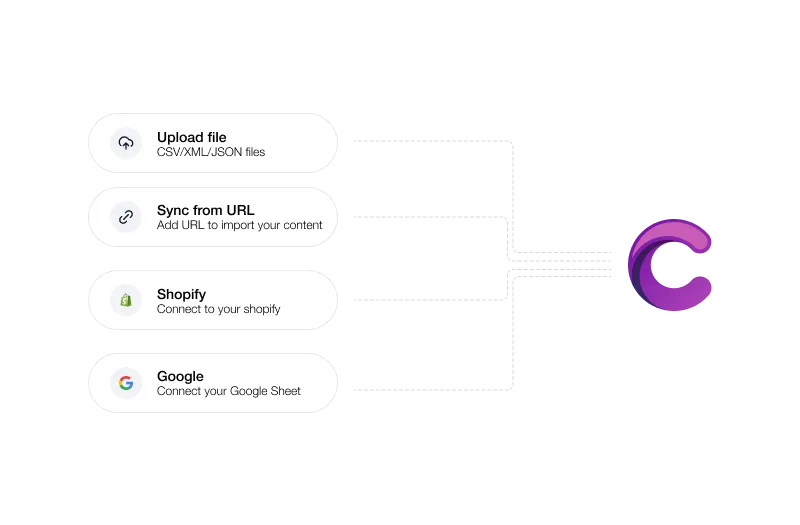
    Import product data from the sources you already use - Excel, CSV, JSON, Google Sheets, Shopify, or even direct sync via URL.

  • Mockup

    Always Up-to-Date

    Schedule automatic updates so your ads always reflect your latest products, pricing, and availability - no more manual syncs or outdated campaigns.

Get started with feed management

From raw product data to polished creatives - streamline your feed workflow in five simple steps.

  1. Connect your feed

    Link your CSV, Excel, or live product feed directly to Campaign Builder.

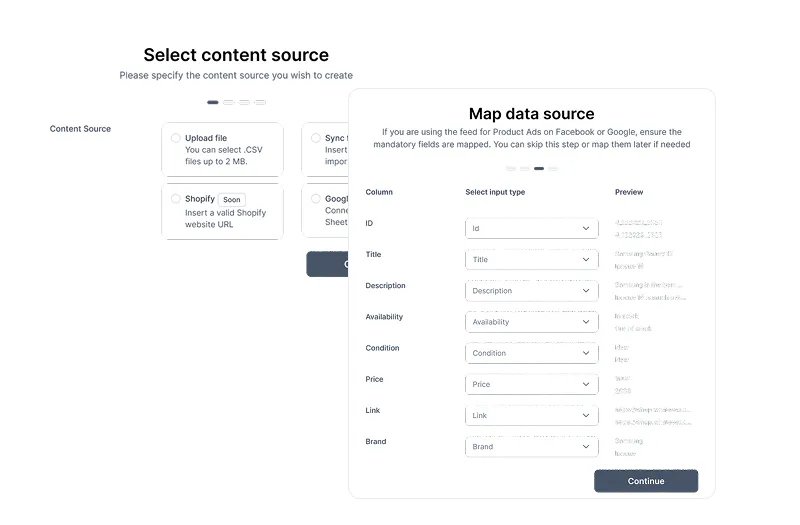
  2. Map your data

    Easily match feed fields like title, image, price, and description to your ad templates.

  3. Design feed-based templates

    Create reusable templates that automatically pull product info from your feed for every creative.

  4. Generate multiple creatives

    Automatically create hundreds of ad variations from a single feed - no manual work needed.

  5. Publish and update dynamically

    Export your creatives or connect directly to ad platforms. Update your feed, and all linked creatives update instantly.

Everything you need to manage your feeds

From product data to campaign-ready creatives - control every step of the feed workflow.

  • Multi-platform feed

    Connect feeds from Shopify, WooCommerce, CSV, or custom sources to build creatives automatically.

  • Dynamic template mapping

    Assign feed fields to ad templates so titles, images, and prices populate automatically.

  • Bulk creative generation

    Turn a single feed into hundreds of creative variations in seconds - ready to publish.

  • Real-time updates

    Update your feed, and all associated creatives refresh instantly - no re-export needed.

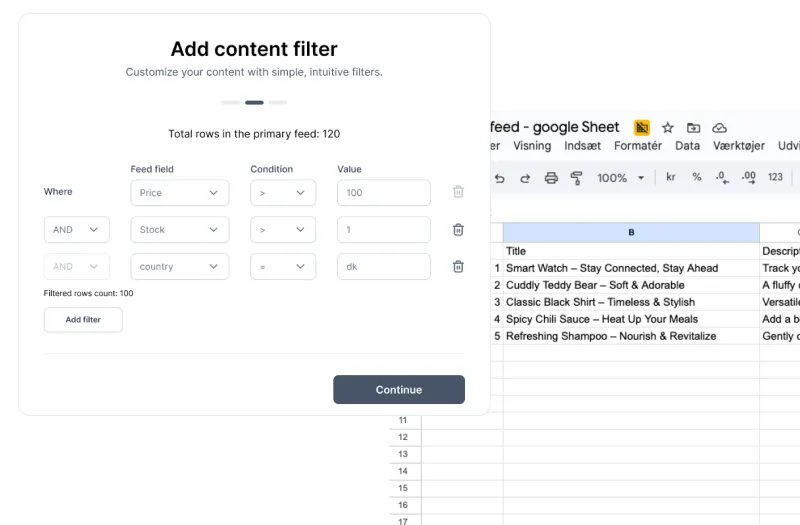
  • Feed-based rules & logic

    Set conditions like “only show products in stock” or “highlight discounted items” for smarter creative generation.

  • Automation at scale

    Connect feeds to your workflow for ongoing campaigns, catalog ads, and multi-market rollouts.

  • Analytics-ready

    Track performance per product, category, or template to optimize your creatives continuously.

  • Brand consistency

    Keep your feed-based ads consistent with brand guidelines across all formats, markets, and templates.

Frequently asked questions

Everything you need to know about Data Feeds

What is feed management?

Feed management is the process of importing, organizing, optimizing, and syncing your product data so it’s accurate and usable for advertising and marketing platforms.

Which platforms does Campaign Builder support for feed export?

Campaign Builder supports feed outputs for platforms including Meta (Facebook & Instagram), Google Shopping, TikTok, and other advertising networks.

Can I automate feed updates?

Yes. Set up scheduled syncs so your product data updates automatically, keeping prices, availability, and content fresh without manual intervention.

How does feed optimization improve ad performance?

Optimized product feeds reduce errors, improve relevance, and help ad platforms match products to the right audiences, resulting in better click-through rates and conversion.

Can agencies manage multiple clients’ feeds?

Absolutely. Agencies can manage, apply optimization rules, and automate feed workflows for multiple client catalogs from a workspace.

Create More Data Feeds. In Less Time

Ready to Take Control of Your Product Feeds?

Accurate, optimized product data means better ads, fewer errors, and more conversions. Start managing your product feeds with confidence today.